A ready-made MCP server for Polish transaction prices
Cenogram gives an AI assistant access to 8M+ transactions from Poland's national price registry (RCN) - prices recorded in notarial deeds, not asking prices from listings. You connect over one endpoint with OAuth 2.1 and get more than 20 tools. You plug in a ready server instead of building your own.
Claude, ChatGPT and Grok connect by signing in with your Cenogram account - no key needed. You take an API key when you work in Cursor, VS Code, Claude Code or the REST API.
Connect Cenogram to your assistant
Pick your app or editor. We show the Claude, ChatGPT and Grok setup in short videos.
Claude with a Cenogram account
Sign in with your Cenogram account and start right away
- Open claude.ai → Settings → Connectors
- Click Add custom connector:
Name: Cenogram
URL: https://mcp.cenogram.pl/mcp - Click Authorize - sign in with your Cenogram account
- Pick the latest Opus model in the menu at the bottom of the chat window
Works on claude.ai, Claude Desktop and the mobile app. Requires a free Cenogram account.
ChatGPT with a Cenogram account
Connect through developer mode and ask about RCN data in the chat
- In Settings → Security and login enable Developer mode
- Go to Settings → Plugins → Browse plugins and click Create app
- In the New Plugin dialog enter the name Cenogram and the address:
MCP Server URL: https://mcp.cenogram.pl/mcp
- Leave Authentication on OAuth, check the consent box and click Create
- Sign in with your Cenogram account (OAuth)
Requires ChatGPT Plus (Developer mode). A free ChatGPT account has no MCP connectors.
Your first question after connecting
Ask in plain language about prices from notarial deeds
"What is the median price of ~55 m2 apartments in Toruń on the secondary market since April 2024?"
→ 1,378 comparable transactions, median PLN 8,340/m² - computed on notarial-deed prices, not listings. Each transaction carries the date, area, market segment and parcel identifier.
Figures illustrative - the registry is refreshed roughly every two weeks.
Claude Code, Cursor and VS Code
You need an API key to connect. Generate one on a free Cenogram account.
Claude Code
One command in the terminal
claude mcp add cenogram \
  https://mcp.cenogram.pl/mcp \
  -t http \
-H "Authorization: Bearer YOUR_API_KEY"Requires an API key
Cursor / VS Code
JSON config with an API key
{
  "mcpServers": {
    "cenogram": {
      "type": "http",
      "url": "https://mcp.cenogram.pl/mcp",
      "headers": {
        "Authorization": "Bearer YOUR_API_KEY"
      }
    }
  }
}Requires an API key
Local server (stdio + npm)
For Cursor, VS Code and Claude Code - API key cngrm_…
{
  "mcpServers": {
    "cenogram": {
      "command": "npx",
      "args": ["@cenogram/mcp-server"],
      "env": {
        "CENOGRAM_API_KEY": "cngrm_…"
      }
    }
  }
}The same key works in the REST API and the MCP server
Grok with a Cenogram account
Add a custom connector and ask about RCN data in the chat
- In a new chat click + → Add connector
- In the dialog pick Custom
- Enter the name Cenogram and the Server URL:
https://mcp.cenogram.pl/mcp
- Sign in with your Cenogram account (OAuth)
- In the conversation ask Grok to use Cenogram
Requires a paid Grok account (custom connectors). Works in the web and mobile apps.
An MCP connector for Polish real estate prices
The agent picks the tool from your question. The most used ones:
Search
search_transactions- search by location, property type, price, date and areasearch_by_area- radius search around lat/lng coordinatessearch_by_polygon- search inside an arbitrary GeoJSON polygon
Statistics and market
get_price_statistics- price per m² statistics by locationget_market_overview- overview: total count, date range, breakdownscompare_locations- side-by-side price comparison across locations
Parcel
resolve_parcel- resolve a cadastral parcel identifierget_parcel_report- full parcel report in one callestimate_value- comparable-sales value estimate [Beta]estimate_land_value- comparable-sales value estimate for undeveloped land [Beta]get_permits_in_area- building permits and works notifications within 2 km of a point
The agent has 20+ tools, including parcel context layers (flood, zoning, permits, buildings) and location context. Full list in the docs →
Parcel context inside an AI assistant
The same server gives the agent cadastral parcel data: the local zoning plan (MPZP) and general plan for a parcel, a parcel's flood risk, plus the register of monuments, landslides, building permits, transit access and agricultural use.
"Check the details of parcel 126104_9.0015.201 and its surroundings"
→ search_transactions(parcelId="126104_9.0015.201")
→ get_parcel_report(parcelId="126104_9.0015.201")
The agent resolves the parcel, pulls the notarial-deed history for that same identifier and adds context: the zoning plan, the flood hazard zone, building permits and the surroundings. One tool - get_parcel_report - assembles the full report.
Want a parcel report for an AI agent? That is one call instead of ten queries to separate sources.
Use a ready server or build your own?
Transaction prices are public. But a raw registry is not the same as data an agent can use.
| Raw public registry | Your own server | Cenogram | |
|---|---|---|---|
| Access | single records, no API | you build and host it yourself | REST and MCP, one endpoint |
| Aggregation | you compute it yourself | you code it yourself | statistics, medians, comparisons |
| Coverage | 380 counties of varying quality, each one separate | as much as you collect yourself | unified and normalized, since 2003 |
| Parcel context | - | you integrate it yourself | flood, zoning, permits, buildings - one tool |
| Authentication | - | you do it yourself | OAuth 2.1 or API key |
| Maintenance | yours | ingest, updates, hosting - yours | on us, registry every ~2 weeks |
What a transaction holds, and what a parcel layer holds
The agent picks the tool itself. Here is which layer answers what.
| Layer | What you get | Tool |
|---|---|---|
| Transactions | deed prices, area, date, market segment | search_transactions, get_price_statistics |
| Spatial search | radius around a point, GeoJSON polygon | search_by_area, search_by_polygon |
| Parcel | resolve by identifier, deed history | resolve_parcel |
| Zoning and buildings | local zoning plan, general plan, storeys | get_parcel_report |
| Risks and surroundings | flood, landslides, monuments, permits, transit | get_parcel_report |
A ready server, open code
The server is in the official MCP registry and on npm, and the stdio client code is open on GitHub. Give your assistant prices straight from notarial deeds.
Listed in registry.modelcontextprotocol.io and mirror catalogs
@cenogram/mcp-server - real monthly downloads, counter on the package page
The stdio server is open on GitHub - you see what you connect to your assistant
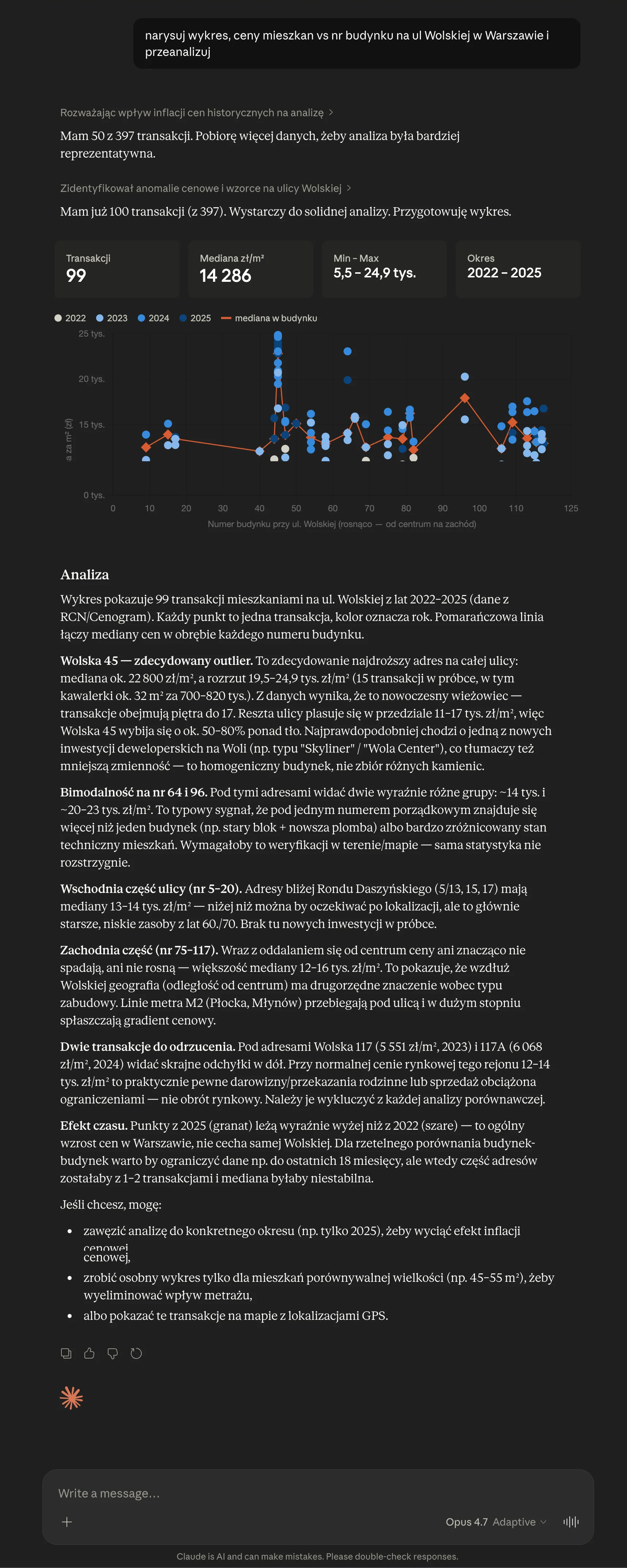
Price analysis - Wolska St., Warsaw
Scatter plot, east-west price gradient
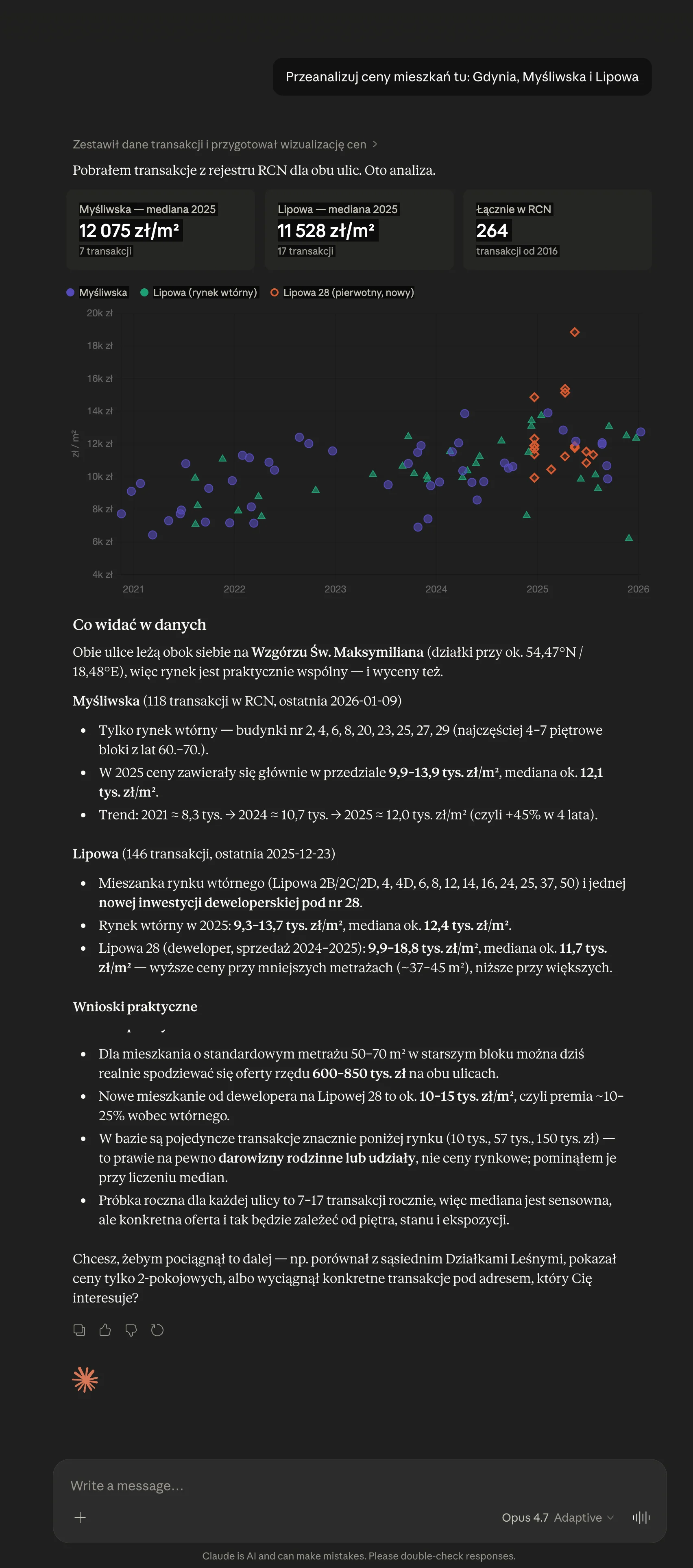
Street comparison - Gdynia
Myśliwska and Lipowa, trend 2021-2026
Supported clients: Claude (web, Desktop, mobile), ChatGPT, Grok, Cursor, VS Code, Claude Code.
Prefer REST?
You get the same data over the API - JSON endpoints, spatial search, statistics and parcel context.
Questions and answers
Cenogram is a ready-made MCP server with prices from Poland's real estate price registry (RCN) - recorded in notarial deeds, not listings. It gives an AI assistant access to 8M+ transactions across 380 counties, from 2003 onward, over a single endpoint with OAuth 2.1 authentication. You connect it to Claude, ChatGPT or Cursor with no code and without building your own server.
Yes - Cenogram. Beyond transaction prices from the real estate price registry, it gives an AI assistant cadastral parcel context: the local zoning plan (MPZP) and general plan, flood risk, the register of monuments, landslides, building permits, transit access and agricultural use. You connect it to Claude, ChatGPT or Cursor without building your own server.
Connect the Cenogram MCP server and ask about a parcel by its cadastral identifier. The agent calls get_parcel_report and returns the local zoning plan (MPZP) and general plan for that parcel, together with its transaction history from notarial deeds.
Yes. The Cenogram MCP server gives the assistant flood hazard zones for a parcel, alongside landslides, the register of monuments, building permits and transit access. All through a single get_parcel_report tool.
You can connect Claude on a free Cenogram account (OAuth), including on claude.ai and Claude Desktop. ChatGPT requires a Plus plan (developer mode) and Grok a paid plan with connectors - a free ChatGPT account has no MCP connectors. Cursor, VS Code and Claude Code connect with an API key.
Free to begin: 400 tokens to start, then 50 tokens a week, no card required. Then Standard at PLN 49 net per month (2,000 tokens), Professional at PLN 99 (5,000), Advanced at PLN 299 (25,000) and Business at PLN 1,499 (200,000). The same key works in the API and the MCP server.
The price registry is refreshed roughly every two weeks. The data goes back to 2003 and covers all 380 Polish counties.
The public registry is single records across 380 counties of varying quality, with no API, no aggregation and no consistent history. Cenogram serves the same data - normalized, over REST and MCP, with statistics, spatial search and parcel context. An AI agent uses it right away.
Connect Cenogram to your AI
400 tokens to start, then 50 tokens a week. Account in 30 seconds, no card.